
What You Need to Know
Dashboardly supports connecting multiple TikTok Shops under one account. This is perfect for sellers who operate different brands or regional shops. Each connected shop gets its own analytics, but you can also view combined data across all shops.
If this is your first shop, see Getting Started for the initial signup and authorization flow.
How to Connect Additional Shops
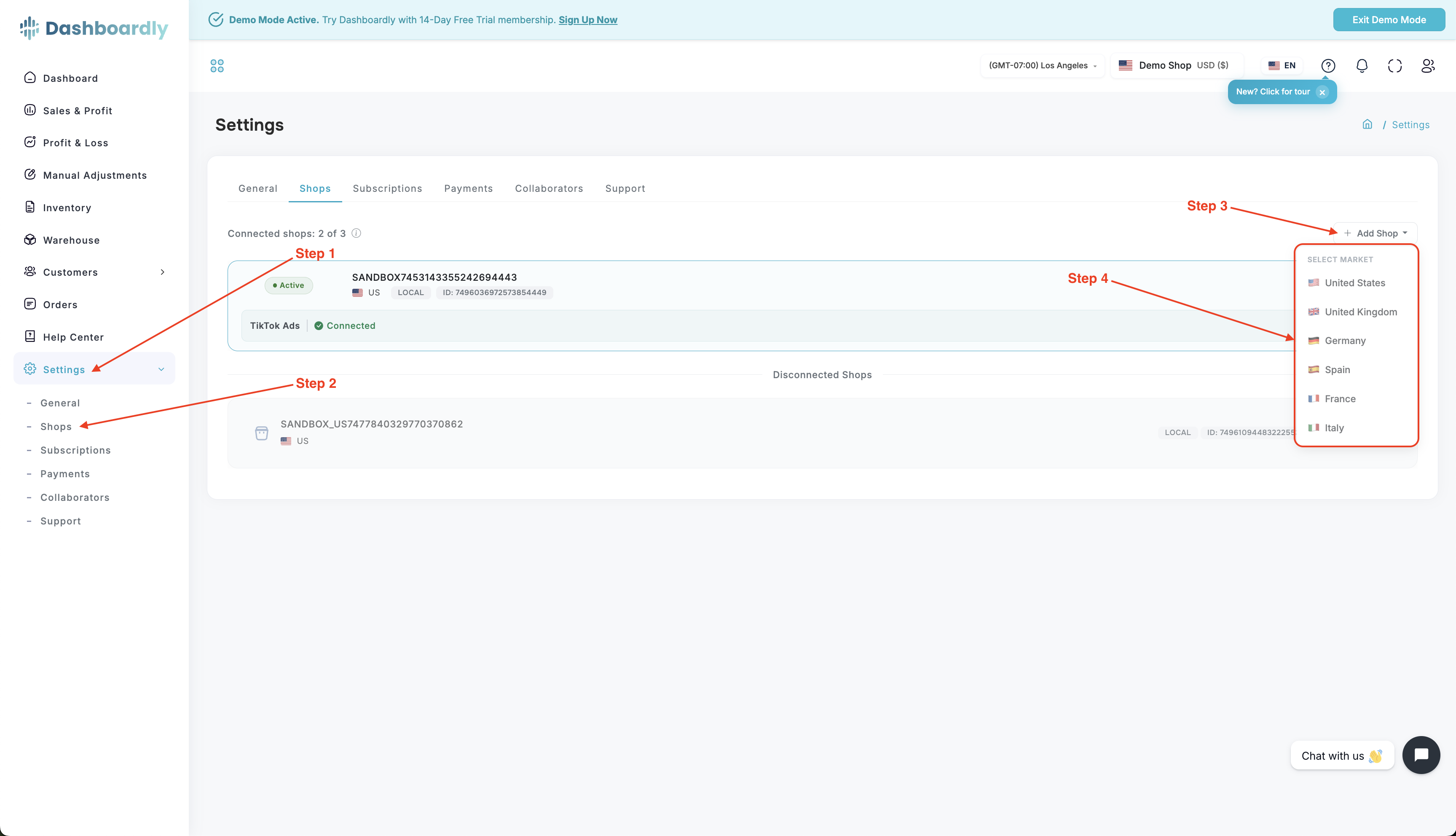
- Go to Settings in the left sidebar.
- Open the Shops tab at the top.
- Click the Add Shop button.
- Select the market (region) for this shop from the dropdown (e.g., US, UK, DE).
- You will be redirected to TikTok's authorization page for that region.
- Log into the TikTok account that owns the shop.
- Grant Dashboardly permission to access your shop data.
- You will be redirected back to Dashboardly with the new shop connected.
Important Details
- Each shop requires its own TikTok authorization
- Data import begins automatically after connecting
- The first import for an additional shop usually takes 15-60 minutes; very large shops can take several hours
- You can switch between shops using the shop selector in the top navigation bar
- All connected shops are covered by your single Dashboardly subscription -- there is no per-shop fee within your plan's shop limit. If you need more shops than your current plan allows, upgrade the plan (see Plans and Billing).
Common Questions
Can I see combined data from all my shops?
Yes! Use the shop selector dropdown and choose All Shops to see aggregated metrics across all connected shops.
What happens if I disconnect a shop?
Disconnecting a shop stops data sync but does not delete historical data. You can reconnect later and the data will be preserved. For details on the authorization flow used when reconnecting, see Getting Started.
Is there a limit on how many shops I can connect?
Yes -- the number of shops included depends on your plan.
Brand plans (for sellers managing their own shops):
| Plan | Shops Included |
|---|---|
| Starter | 1 |
| Growing | 3 |
| Pro | 5 |
Agency plans (for agencies managing client shops):
| Plan | Client Store Slots |
|---|---|
| Agency Starter | 10 |
| Agency Growth | 20 |
| Agency Pro | 40 |
| Custom | Contact sales |
For the full comparison and pricing, see the Plans and Billing article.