
Overview
When you first open Affiliate Performance, compact placeholders show where the summary cards and creator rows will appear while your data loads. Creator and creative tables also show row placeholders during their first load. These placeholders represent loading, not zero results. If a request fails, the page shows the error and retry control.
Affiliate Performance shows which TikTok creators drive affiliate orders and how those orders contribute to profit. Brands can review one active shop. Agency accounts can compare creators across connected clients and shops without converting or mixing currencies.
The page is available to account owners and to collaborators whom an owner grants Affiliate Performance access for a connected US shop under Settings > Collaborators. An agency team member also needs Reports: View to open the Affiliate tab in Agency > Reports. A shop that already granted TikTok's seller.affiliate_collaboration.read permission can use the report immediately. Older US connections without that permission see the owner reconnect or secure owner-invite workflow on the page. TikTok does not currently expose this Affiliate Seller API permission to Dashboardly for non-US shops, so the Affiliates navigation item is hidden for those shops.
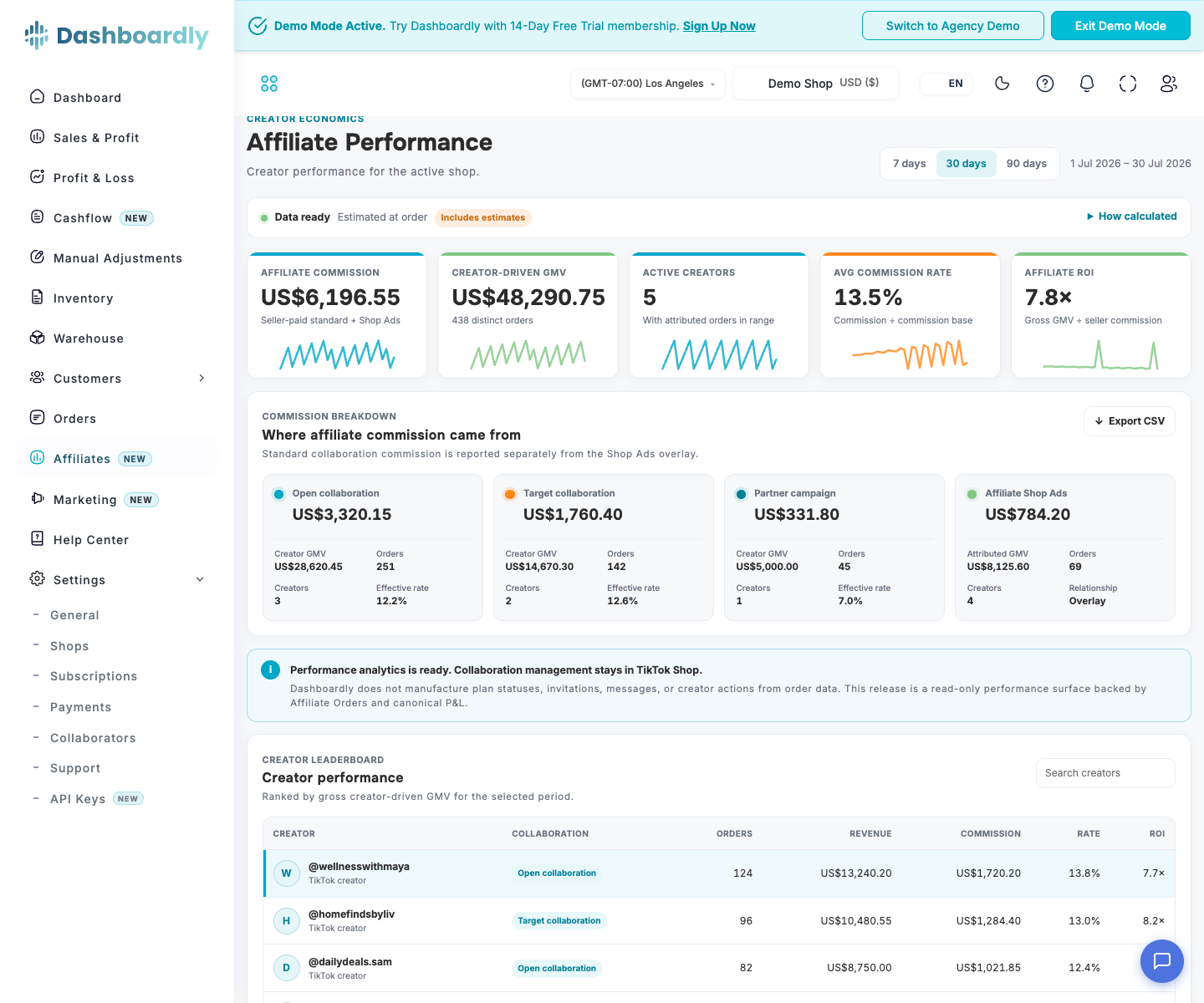
Preview in Demo Mode
Affiliate Performance is populated in both Dashboardly demo experiences. The brand demo shows one US shop, and the agency demo shows a cross-client roll-up for its active US shops. The agency demo's UK shop remains available elsewhere in Demo Mode but is excluded from this US-only page.
Demo creator, content, product, GMV, commission, and GMV Max creative rows are realistic synthetic data matched to the demo's canonical orders and P&L facts. The creative rows let you explore spend, paid traffic, blended revenue, ROAS, ACoS, CTR, and CPC in the creator detail view. They are not imported from a real TikTok account, and Demo Mode never creates fake OAuth tokens or grants the seller.affiliate_collaboration.read permission. Dashboardly reads the synthetic demo facts directly and never asks you to reconnect or reauthorize a sample shop.
Choose a Period
Use the period control to view the last 7, 30, or 90 days, or choose Custom for any inclusive range of up to 90 calendar days. Dashboardly applies that one range to the Affiliate Orders facts and the canonical P&L allocation. When you change the period, the current results remain visible with an Updating state until the new range is ready; choosing another period replaces the pending request.
If a connected US shop has complete Affiliate creator facts for the beginning of your selected period but the latest days are not yet verified, the date picker stays on the period you selected and the page shows the verified Affiliate portion instead of hiding all earlier creator results. The notice names both the selected dates and the shop-local dates included in Affiliate calculations. Creator GMV, commission, creator-linked estimated profit, video matches, details, and exports on this page use that same verified portion so they are not mixed with newer data from a different source. The separate Profit & Loss and Marketing pages still use their own full selected-period data and are not shortened by this Affiliate import state. Excluded Affiliate dates are not treated as zero. A first import, missing earlier history, invalid source data, or a failed verification still leaves creator attribution unavailable rather than inventing results.
Each currency has a separate roll-up. Dashboardly does not apply an implicit foreign-exchange conversion.
Read the Performance Overview
The five summary cards lead with Creator-driven GMV, followed by Affiliate commission, Avg commission rate, Affiliate ROI, and Estimated net profit. The GMV card also shows the active creator and order counts. Each trend line uses the daily Affiliate Orders in your selected period; it is not sample data or a forecast.
The Commission breakdown separates Open collaborations, Target collaborations, partner campaigns, and the Shop Ads overlay. Standard collaboration cards show GMV, distinct orders, active creators, and the effective rate for that collaboration type. Shop Ads can overlap a standard collaboration order, so Dashboardly shows it as an overlay instead of adding its order count to the standard collaboration counts.
Effective commission rate = seller-paid commission ÷ TikTok commission base
Affiliate ROI = gross creator-driven GMV ÷ seller-paid affiliate commission
For example, if creators generate $20,000 in gross GMV and the normalized seller-paid commission is $2,000, Affiliate ROI is 10.0×. Use the labelled commission basis and estimated-data badge when comparing that value with TikTok Shop.
Analyze Creators, Content, and Products
The Creator performance leaderboard can rank creators by creator-driven GMV, estimated net profit, estimated net margin, Affiliate ROI, or Affiliate commission. Choose 10, 20, or 30 creators per page and use the numbered pagination controls to move through the result. Select a creator to open a dedicated detail window with their GMV, commission, average commission rate, Affiliate ROI, estimated profit and margin, distinct video count, shipped/delivered sample milestones, products, and TikTok content for the period. Search filters the current shop's creator list without changing the selected dates.
Product names in creator details and Top products via affiliates open that product's Dashboardly Product Overview when TikTok returned a canonical product ID. A SKU-only grouping stays readable but is not turned into a dead product link. For video content, Dashboardly shows the complete TikTok content ID and links VIDEO to the creator's public TikTok video when TikTok returned both a valid creator username and video ID. Dashboardly does not invent a link for LIVE content or incomplete identifiers.
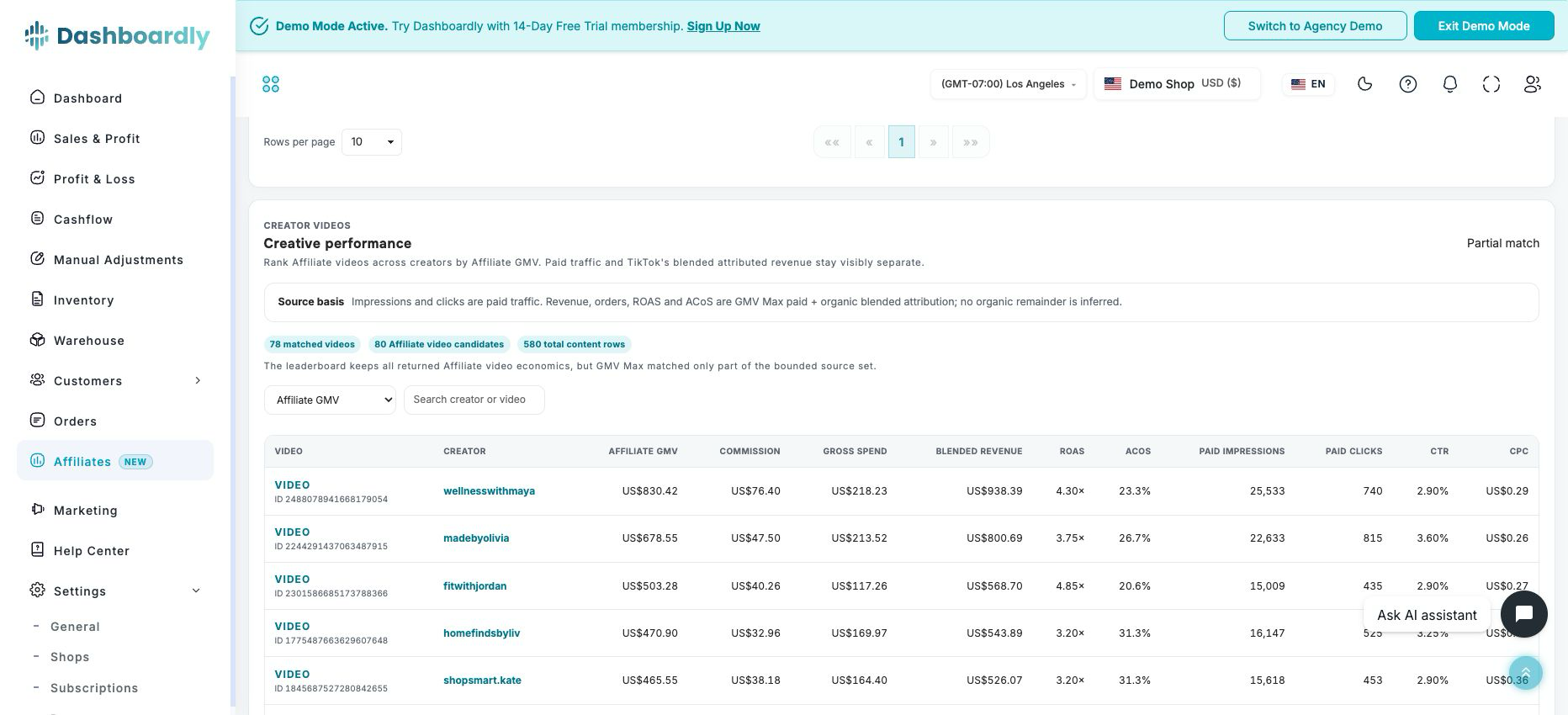
When the same video ID exists in imported GMV Max creative data, the detail window also shows gross and net spend, ad credits, TikTok-attributed blended revenue and orders, ROAS, ACoS, cost per order, paid impressions, paid clicks, CTR, CPC, and CPM. When TikTok supplies stable video metadata, Dashboardly also shows the source caption beside the full content ID, so you can recognize and search a creative without opening every video. Unmatched videos stay visible with their Affiliate facts and blank advertising metrics instead of being dropped.
Sample orders and Shipped samples are different. TikTok marks an order as a sample independently of fulfillment. Dashboardly labels a creator sample as shipped only when TikTok supplies a ready-to-ship timestamp, tracking, or a shipped/later status; delivery requires TikTok's delivery timestamp or delivered/completed status. If the source counts do not reconcile, shipment milestones stay unavailable instead of treating every requested sample as sent. Estimated net profit already follows canonical P&L and its sample-cost setting, so the creator view does not add sample cost a second time.
The shop-level Creative performance leaderboard compares every eligible Affiliate video across creators without opening each creator separately. Search by creator, video ID, or an imported TikTok caption; rank by Affiliate GMV, Affiliate commission, gross ad spend, blended attributed revenue, ROAS, ACoS, or paid CTR; choose 10, 20, or 30 videos per page; and open the public TikTok video or its creator detail window from the same row. Search, sorting, totals, and pagination are applied on the server to the complete source range, not to a pre-truncated “top videos” list. The table keeps unmatched Affiliate videos instead of silently filtering them out. If TikTok omits a username on one order line but the exact same video ID has one unambiguous named creator elsewhere in the selected shop and period, Dashboardly keeps that line with the named creator. A video with no proven owner, or conflicting source owners, stays visible as Unknown creator and does not open a fabricated creator profile.
An imported caption is TikTok's source text, not a speech transcript or a Dashboardly-generated hook analysis. Dashboardly does not save TikTok's temporary video preview or cover links as durable creative media. Creator profile images use the separate, refreshable Marketplace enrichment described below. A future transcript or script-analysis feature requires a separate approved media-processing and privacy contract, so the current page never presents a caption as verified spoken wording.
TikTok defines those sources differently:
- GMV Max impressions and clicks are paid traffic.
- GMV Max revenue, orders, ROAS, and ACoS use TikTok's paid + organic blended attribution. Dashboardly does not relabel them as paid-only revenue.
- Shop Ads GMV is the exact Affiliate-order overlay where TikTok reported seller-paid Shop Ads commission.
- Other Affiliate GMV is the remaining Affiliate GMV. It can contain organic and other attribution, so it is not labelled organic GMV.
This distinction prevents a blended TikTok attribution total from being presented as an exact paid-versus-organic sales split. GMV Max uses a 24-hour attribution window, and net spend can update up to 11 hours later.
TikTok's Affiliate Orders response does not include a creator profile-image URL. When your shop has also granted TikTok's Creator Marketplace read permission, Dashboardly matches the exact creator username and shows the Marketplace nickname and current profile image. Missing profiles are processed before periodic refreshes, large creator lists continue in bounded background pages, and signed images are refreshed before they expire. Images are accepted only from TikTok's secure image hosts and are never guessed or scraped. If the additional permission or a safe exact match is unavailable, the creator marker falls back to their initial without hiding any financial results.
The Performance signals section highlights deterministic observations from the current period, including the leading creator, creator concentration, and the lowest available estimated margin. These are explanations of the current data, not automated recommendations or actions.
The Product × creator heatmap shows which creator-product combinations generated the most gross GMV. The Top products via affiliates section combines GMV, creator reach, orders, units, and seller-paid commission for each product. Export creators CSV downloads all creator rows for the selected shop and period, not only the currently visible pagination page. In agency mode, that export contains the complete cross-client creator roll-up for the selected period. Export all videos CSV downloads the complete creative result for the current shop, period, search, and sort selection — including videos beyond the visible page and their available Affiliate and GMV Max fields. Exports fail visibly instead of silently truncating an unusually large result.
Refresh After Connecting or Reconnecting
Connecting a shop and importing its Affiliate history are separate steps. If the first import is still running, the report says that Affiliate data is not ready yet. Select Refresh data to check the same shop and reporting period again; you do not need to change the dates or reconnect repeatedly. The button is disabled while the current request is running.
A missing Affiliate permission still shows the separate reconnect instructions. An incomplete import or a temporary error never becomes zero performance. Creator GMV and commissions can be available while estimated profit and margin remain unavailable until the required canonical P&L data is ready.
Manage Collaborations in TikTok Shop
Affiliate Performance is a read-only analytics page. Create or edit collaboration plans, invite creators, send messages, and manage samples in TikTok Shop. Dashboardly does not infer invitation status, plan status, or creator actions from Affiliate Order records, so unsupported management controls are not shown as if they were available.
Metrics
Affiliate GMV
Gross merchandise value is the TikTok SKU price multiplied by ordered quantity, counted once per affiliate order/SKU line. It is shown before returns and refunds and is not the margin denominator.
Commission Base
TikTok supplies two possible bases:
- Estimated at order: ordered sale price and quantity before final return outcomes.
- Actual after returns: TikTok's actual post-return commission base after finality.
Dashboardly uses one labelled basis for the whole shop and period. It never silently adds estimated and actual bases into one unlabeled total. An agency roll-up can show Mixed by shop when complete shops use different labelled bases.
Affiliate Commission
Creator, partner-campaign, and Shop Ads commissions come from TikTok Search Seller Affiliate Orders. Dashboardly normalizes creator and partner-campaign commission into one standard affiliate-commission total and also shows the partner component separately for disclosure. That disclosure is not added again. TikTok/co-funded creator and partner bonuses are not treated as seller cost unless a seller-ledger field proves the seller-funded share.
Estimated Net Profit and Margin
Dashboardly matches affiliate order/SKU facts to canonical P&L facts, then proportionally allocates canonical net profit and net sales to each creator.
Estimated net margin = allocated canonical P&L net profit ÷ allocated canonical P&L net sales
Shop, creator, and currency roll-ups divide summed allocated profit by summed allocated net sales. They never average percentages and never use gross Affiliate GMV as the denominator.
When a verified financial snapshot is used during a refresh, Dashboardly distributes that snapshot’s profit and net sales using the current order proportions. Those proportions include the whole shop, including orders without creator attribution. The figures remain estimates; they do not claim that each creator’s current orders have reached final settlement.
During a background refresh, estimated profit and margin can use a verified financial snapshot covering every selected day for up to ten minutes after it was calculated. If any selected day is missing, too old, or not verified, the financial allocation stays unavailable until the full period is ready. Refreshing never combines a partial financial period with complete Affiliate results.
Recently viewed reports request background refreshes before current or previous-day financial snapshots expire. Missing days take priority, and an update is published only when its underlying financial facts are ready. If those facts are still processing, estimated figures can remain temporarily unavailable while verified Affiliate GMV and commissions stay visible.
Open How calculated to see count-only allocation coverage: how many Affiliate order/SKU facts and distinct orders have canonical P&L weights. These diagnostics never expose order, creator, SKU, product, or content identifiers. If even one valid Affiliate fact lacks a canonical weight, the coverage is partial and estimated net profit, net sales, and margin remain unavailable for the whole range.
Canonical P&L Affiliate-attributed sales is a separate metric. When the canonical P&L range is ready, Dashboardly distributes that total across creators by the Affiliate API commission base, so it can remain available when the order/SKU weights required for estimated margin are incomplete. If canonical P&L is still processing or temporarily unavailable, Affiliate GMV and commission remain visible from the validated Affiliate source while Affiliate-attributed sales and every estimated P&L field stay unavailable. It is not Affiliate GMV or the TikTok commission base.
In an agency report, each US shop is checked independently. If a shop's P&L snapshot is preparing, its verified Affiliate GMV, commission, creators, and videos remain visible; estimated P&L fields for that shop are marked unavailable. A currency roll-up does not present a partial sum of profit from only the ready shops as if it covered every shop. Missing or invalid Affiliate source facts still fail closed rather than becoming zero-valued sales.
Affiliate commission base and Affiliate API commission amounts are not expected to equal P&L Affiliate Sales or finance-ledger commissions. These sources use different discount, return, and settlement bases. Dashboardly keeps them clearly labelled instead of blocking valid creator data on a false one-to-one comparison.
Data Statuses
- Data ready: scope, region, import coverage, currency, creator identity, commission basis, and internal creator-to-shop totals are complete. Affiliate GMV and commission can be ready even when a valid Affiliate order has no canonical P&L match; in that case estimated net profit, net sales, and margin remain unavailable instead of using a partial or zero weight.
- Partial allocation coverage: count-only diagnostics identify unmatched Affiliate facts and orders. Source-domain Affiliate GMV and commission stay available without waiting for a slower canonical P&L calculation, while Affiliate-attributed sales and every estimated P&L allocation remain unavailable until their canonical data is ready.
- Includes estimates: at least one Affiliate API or canonical P&L value has not reached final settlement.
- Partial Affiliate coverage: for one shop, the selected period includes recent Affiliate dates that are not verified yet, but an earlier complete day-by-day prefix is available. The date picker remains on the selected period; the page names the exact Affiliate dates included and keeps creator-linked metrics, tables, details, and exports on those dates. This does not change the date range or availability of the separate Profit & Loss and Marketing pages.
- Partial data: one or more shops are excluded from agency roll-ups. Missing values are never presented as zero.
- No creator orders: the import is complete for the period but no creator-attributed orders exist.
Dashboardly fails closed when a range has incomplete lower history, no verified complete-day prefix, mixed currency within one shop, duplicate identities, non-conserving Affiliate totals, or a malformed commission base. A stale upper boundary may yield only the clearly labelled complete-day prefix described above, after the source independently validates that shorter range. An unresolved canonical order/SKU match disables only the separate estimated P&L allocation for the effective range; Dashboardly does not discard otherwise valid Affiliate API GMV or commission and does not manufacture a canonical weight.
Dashboardly continues to show verified Affiliate facts during a delayed recurring sync when it can prove a complete shop-local prefix. A first-time import or a requested period with no such prefix remains unavailable, so an in-progress sync never presents partial history as complete.
Grant the Permission to an Older Shop
US shops connected before Dashboardly received the Affiliate permission may need to authorize again. Affiliate Performance shows two recovery choices without presenting missing data as zero:
- Reconnect now: the Dashboardly account owner can open TikTok authorization immediately and approve the new permission. Only the account owner can use this action because reconnecting must remain bound to the existing merchant and shop.
- Send invite to owner: an authorized Dashboardly user can email the shop owner a secure reauthorization link. The recipient approves the permission in TikTok; the link cannot be used to reconnect a different merchant or shop. Dashboardly limits repeated delivery so the owner is not spammed. Open the authorization link in the email to continue to TikTok. The link remains valid for seven days; if it has expired, return to Affiliate Performance and choose Send invite to owner again.
Existing Dashboardly data and settings remain intact. After successful authorization, up to 90 days of recent Affiliate history imports in the background. A selected period remains unavailable until Dashboardly verifies a continuous complete-day prefix from its start. Once that prefix exists, the page may show only those explicitly labelled Affiliate dates while newer days are checked; it never calls the partial result a complete selected period. Reconnecting the shop is not needed merely because recent import coverage is delayed.
An Affiliate sync that imports no orders can have two different outcomes. When the required permission is missing, the sync records that Affiliate data is unavailable and retains the reason for Support to check. A successful sync with no matching Affiliate orders records that data is available. A completed sync with zero orders alone does not confirm that authorization is complete.
Affiliate Performance is currently US-only. The navigation item and route are unavailable for non-US shops rather than showing an unsupported or misleading zero-data page.
Troubleshooting
The page asks me to reconnect the shop. The shop's current authorization does not include the Affiliate collaboration read permission. If you own the Dashboardly account, choose Reconnect now. Otherwise choose Send invite to owner so the owner can approve the new TikTok permission.
Why don't I see Affiliates in the menu? The current TikTok Affiliate Seller API integration is available to US shops only. Dashboardly hides the item when the active shop is outside the US. If you are a collaborator, ask the owner to check both your access to that shop and its Affiliate Performance permission in Settings > Collaborators. Agency team members also need Reports: View to open the Affiliate tab; the report contains only their assigned US shops.
A longer period is unavailable but 30 or 90 days works. The recent recurring import is ready, but older history has not finished backfilling. Use a covered period or wait for the historical import to complete.
Affiliate Center and P&L show different commission totals. Check the period, the Estimated at order or Actual after returns badge, and settlement timing. Affiliate Performance reports creator payout facts; P&L reports signed finance-ledger cost. They are related but not identical accounting views.
Why does a video show Unknown creator? TikTok did not return one provable creator username for that exact video in the selected shop and period. Dashboardly keeps the source video and its Affiliate economics visible, but it does not guess a creator or open a fabricated profile. When another source line for the exact same video proves one unambiguous username, Dashboardly combines the lines automatically; conflicting usernames remain Unknown creator.
Can Dashboardly show exact paid and organic revenue for each creator video? Not from the current TikTok Shop and GMV Max source contracts. Dashboardly shows exact paid impressions and clicks, exact Affiliate Shop Ads commission disclosure, and TikTok's blended GMV Max revenue separately. It never calculates “organic revenue” by subtracting one differently attributed source from another. Use the source labels in Creator economics and Creative performance when diagnosing attribution.
Why can an external TikTok Pixel report more purchases than the store? Pixel and Events API reporting uses attribution and event matching rather than the store's transaction ledger. Duplicate browser/server events must share the same event ID, and click identity must be carried consistently for reliable matching. Affiliate Performance remains based on TikTok Shop Affiliate orders and does not treat an external Pixel purchase count as order truth. Compare Pixel configuration and event IDs against Shopify or another commerce ledger before changing campaign decisions.